Case study · (b)
Smart Energy Planner
Watt's Next · AI family energy planner
1 page
Candace Hagood
Product & Quality Leader
Outcome
Chores run in the cheapest hours without anyone memorizing a rate sheet.
- ✓Any utility bill becomes a working plan from one photo
- ✓The whole family follows the same schedule, with reminders at start time
- ✓Every AI-read plan is checked by a person before it’s used
Problem
Time-of-use electricity plans like EV-TOU-5 can save a household real money, but almost nobody remembers which hours are cheap — and every utility's rate sheet looks different — so the dishwasher and dryer run at peak prices.
My role · focus · quality · key features›
My role
Product owner and designer. I mapped the rate rules, designed the bill-scan and daily-plan flows, the family-sharing model and the app's personality, and tested it against real household routines.
Product focus
Make saving money effortless and a little fun: snap your bill, let AI build the schedule, pick your chores, and a cheeky 'Foreman' character tells the family when to run them.
Quality & validation
Rate schedules modeled for weekdays, weekends and holidays and checked against the published plan. AI-scanned plans are always shown for review and editing before saving. A dedicated rate-accuracy and disclaimer page and 'last updated' notes show where the numbers come from.
Key features
- ·AI bill scan: photo of your bill becomes an editable rate schedule (paid add-on)
- ·Custom rate plans for any utility, not just EV-TOU-5
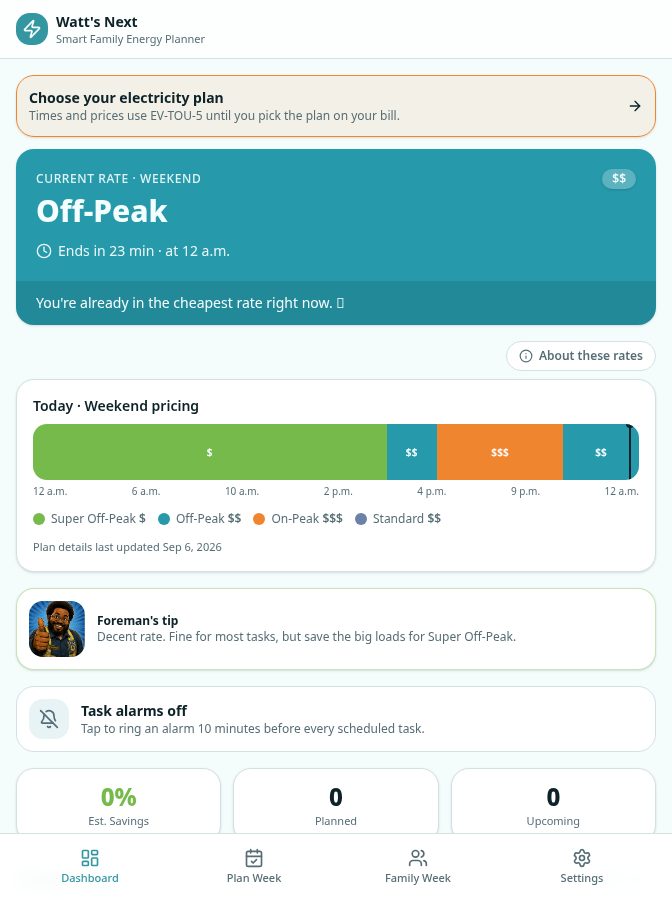
- ·Live view of the current rate and the next cheaper window
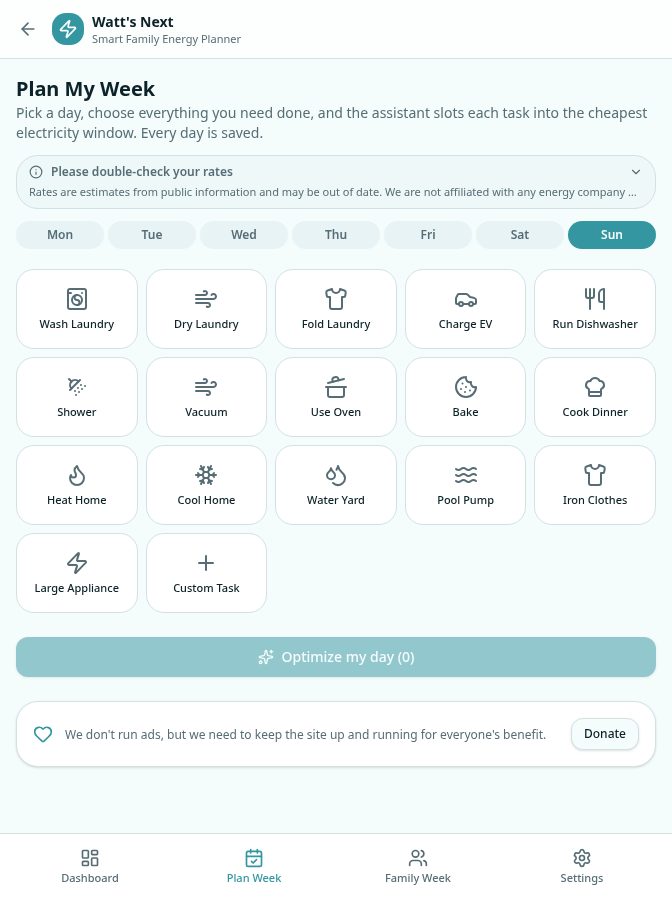
- ·Automatic daily plan that places tasks in low-cost hours, with estimated savings
- ·Alarms when it's time to start a task
- ·Family accounts with invite codes and QR join links
- ·'Foreman' feedback character with AI-generated humor
- ·History, settings, support desk and installable phone app
▤ README.md›
# Smart Energy Planner

> Watt's Next · AI family energy planner

"Watt's Next": an AI household scheduler that reads your electricity bill, builds your rate plan and moves the family's chores into the cheapest hours.

## Outcome

**Chores run in the cheapest hours without anyone memorizing a rate sheet.**

- Any utility bill becomes a working plan from one photo
- The whole family follows the same schedule, with reminders at start time
- Every AI-read plan is checked by a person before it’s used

## Problem

Time-of-use electricity plans like EV-TOU-5 can save a household real money, but almost nobody remembers which hours are cheap — and every utility's rate sheet looks different — so the dishwasher and dryer run at peak prices.

## Solution

Watt's Next turns any utility's rate sheet into a schedule the family actually follows. AI reads the bill, the user confirms the plan, and the app places each chore in the cheapest window and reminds everyone when to start.

| Problem | Solution |
| --- | --- |
| Every utility's rate sheet looks different. | AI bill scan turns a photo into an editable rate plan, and custom plans cover any utility. |
| Nobody remembers which hours are cheap. | A live view shows the current rate and the next cheaper window, with alarms at start time. |
| One person knows the plan; the household doesn't. | Family accounts with invite codes and QR join links share the same daily plan. |

## Features

- AI bill scan: photo of your bill becomes an editable rate schedule (paid add-on)
- Custom rate plans for any utility, not just EV-TOU-5
- Live view of the current rate and the next cheaper window
- Automatic daily plan that places tasks in low-cost hours, with estimated savings
- Alarms when it's time to start a task
- Family accounts with invite codes and QR join links
- 'Foreman' feedback character with AI-generated humor
- History, settings, support desk and installable phone app

## Tech stack

- TanStack Start (React SSR)
- TypeScript
- Tailwind / Radix UI
- Lovable Cloud (Postgres, auth)
- Lovable AI Gateway (vision bill reading)
- Stripe payments
- QR codes
- Installable web app

## Notable components

- Photo-to-rate-schedule extraction with a review step
- Chore optimizer that places tasks in the cheapest windows
- 'Foreman' personality layer with AI-generated humor

## Scope

- Weekday, weekend and holiday rate rules modeled
- 12 app screens, including scan, plan, history and family sharing
- AI-read plans always shown for human review before saving

## Links

- Live: https://timmysgrid.lovable.app

## Author

Candace Hagood · Product & Quality Leader · AI Engineering
Skills demonstrated
Consumer UXRules modelingAI document extractionHabit & personality design
How the solution answers the problem
Watt's Next turns any utility's rate sheet into a schedule the family actually follows. AI reads the bill, the user confirms the plan, and the app places each chore in the cheapest window and reminds everyone when to start.
- ProblemEvery utility's rate sheet looks different.SolutionAI bill scan turns a photo into an editable rate plan, and custom plans cover any utility.
- ProblemNobody remembers which hours are cheap.SolutionA live view shows the current rate and the next cheaper window, with alarms at start time.
- ProblemOne person knows the plan; the household doesn't.SolutionFamily accounts with invite codes and QR join links share the same daily plan.
Measurable scope
- ·Weekday, weekend and holiday rate rules modeled
- ·12 app screens, including scan, plan, history and family sharing
- ·AI-read plans always shown for human review before saving
Notable & novel components
- ·Photo-to-rate-schedule extraction with a review step
- ·Chore optimizer that places tasks in the cheapest windows
- ·'Foreman' personality layer with AI-generated humor
Tech stack
TanStack Start (React SSR)TypeScriptTailwind / Radix UILovable Cloud (Postgres, auth)Lovable AI Gateway (vision bill reading)Stripe paymentsQR codesInstallable web app
Why it matters
Shows I can take a confusing rule set, let AI do the hard part, keep a human check on the result, and turn it into a friendly everyday tool.
How it works · From bill to cheaper day
- 01
Scan bill
AI reads the rate schedule from a photo
- 02
Review
User checks and edits the plan before saving
- 03
Pick chores
Laundry, EV, dishwasher, pool pump and more
- 04
Optimize
Tasks placed in the cheapest windows
- 05
Remind
Alarms and Foreman nudges, shared with family
Inside the app
Open live product ↗timmysgrid.lovable.app